How to Track Instagram DMs When Your Inbox Is Full
You marked the chat unread and a thumb cleared it. You started a sheet and it died on your busiest day. Here is every way to track Instagram DMs, and the exact point each one gives up on you.
Quick answer: To track Instagram DMs, connect your Business or Creator account to a tool built for the inbox, then work one list instead of scrolling threads. DM Tracker syncs your conversations through Meta’s official Instagram API, including up to 90 days of recent history, moves each contact through your pipeline stages, and shows you who is still waiting on a reply.
Most people searching this have already tried the obvious fixes. The unread dot got cleared by a thumb. The spreadsheet lasted a week. Here is what each method genuinely does and the point where it quits on you.
Why Instagram DMs Get Lost
Instagram Direct was built for talking to people you like. Selling in it is a different job, and the inbox works against you in a few specific ways.
It sorts by recency, not by who is waiting. The person you answered ninety seconds ago sits at the top. The one who asked what your program costs on Tuesday and never got an answer is somewhere below the fold, quietly deciding you are not that interested.
There are no reminders. Nothing in the app lets you say “come back to this on Thursday”. Marking a chat unread is the nearest thing to it, and a single mistap clears it with no record that it was ever there.
The first message from a buyer often lands where no notification fires. Anyone who does not follow you goes to Requests, with a hidden requests list underneath that, and the General tab does not push notifications at all. Instagram’s Help Center describes this as spam protection, which it is. It also means a serious buyer’s opening line can sit two taps deep in a folder you check once a week.
Nothing shows you who went quiet. Instagram shows you what was said. It will not tell you that the last message in a thread was yours, four days ago, and nobody wrote back. That list is the whole game, and the app has no way to build it.
Two people on one account cannot see each other’s work. No owner, no history of who replied, no way to know whether a lead got two answers or none.
None of this matters at a handful of live conversations. Past that, it is why deals die without anybody making a decision. If your inbox is already at that stage, get the basics of organizing Instagram DMs for business in place before you shop for software.
What Instagram’s Own Tools Track, and Where They Stop
Professional accounts get real inbox features, and most sellers never switch them on. Instagram’s Help Center says the professional inbox lets you flag messages and filter by read, unread or flagged, move chats between your Primary and General inboxes, and rank pending requests by time or by the prominence of the account writing to you. Saved replies handle the questions you answer forty times a week.
At low volume, three habits beat any software:
- Open Requests every morning. Treat it as a second inbox, because that is what it is.
- Mark unread means “I owe this person”. One meaning only. Never use it for anything else.
- Flag the money conversations. Then filter to flagged when you sit down to work.
That system holds until it does not, and it fails in a predictable order. A flag is on or off, with no date attached, so it cannot tell you a buyer has been waiting since Monday. Flags do not age, so the flagged list slowly becomes a second inbox you avoid. Nothing is shared, so a teammate sees none of it. And you get no numbers at all: no reply rate, no sense of how many conversations you let go quiet last month, no idea which opening line performs. Meta Business Suite on desktop adds labels and assignment, which helps, but it still will not show you stages or reply rates.
The honest test is whether you can name, right now, everyone waiting on a reply from you. If you cannot, the habit stack has already broken.
The Spreadsheet Stage, and the Day It Breaks
Nearly everyone builds the sheet. Username, source, date of first message, last touch, stage, next step. It is free, it is yours, and for about a week it is genuinely better than nothing, because for the first time you can see how many conversations are actually open.
Then the cracks show up in the same order every time:
- Everything is typed twice. Every new DM is a row somebody has to create by hand. Nobody does that at hour six of a busy day.
- It goes stale exactly when it matters. The week you get slammed is the week the sheet stops being true, and a sheet you cannot trust is worse than no sheet, because you stop checking it.
- There is no link back to the conversation. You read “sent pricing” and still have to hunt the thread in the app to remember what you said.
- Shared sheets create two versions of the truth. Two setters, two tabs, one lead answered twice.
- Dates do not chase you. A cell that says “follow up Friday” is not a reminder, it is a note you have to go looking for.
The full breakdown of where sheets hold up and where they fall over lives in DM Tracker vs spreadsheets. The short version: a sheet is a good diagnostic for a week and a bad system forever. Generic CRMs have the opposite problem. They are built to hold records, not to read an Instagram inbox, so every conversation still arrives by copy and paste. That is the gap an Instagram DM CRM exists to close.
How to Track Instagram DMs With a Tool Built for It
This is what the workflow looks like in DM Tracker, since that is what we build.
Connect the account. You need a Business or Creator profile, and you approve the connection on Instagram’s own permission screen. The link runs direct through Meta’s official Instagram API, so nothing sits in the middle and no other subscription is required. ManyChat is a partner, not a prerequisite: if you already run keyword triggers there, DM Tracker picks those conversations up anyway because it reads the inbox itself.
Your recent history comes with you, and every new message syncs on its own. On first connect, DM Tracker offers to sync your conversations from up to the last 90 days, so the board starts with the buyers you are already talking to. After that, messages arrive over Meta’s webhooks, so the board updates as things happen rather than when you remember to update it. Anything older than 90 days stays in Instagram, which is the one limit worth planning around.
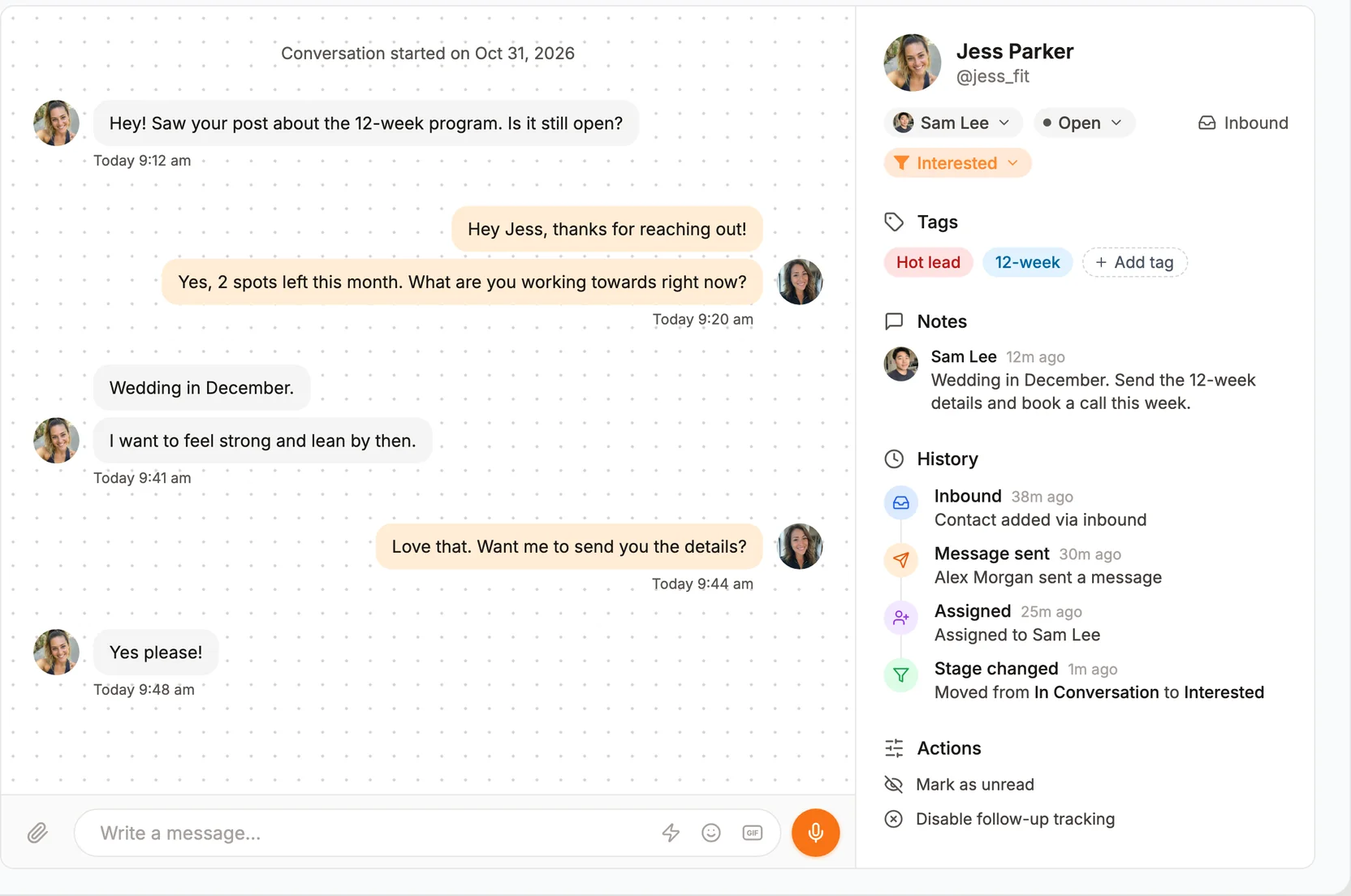
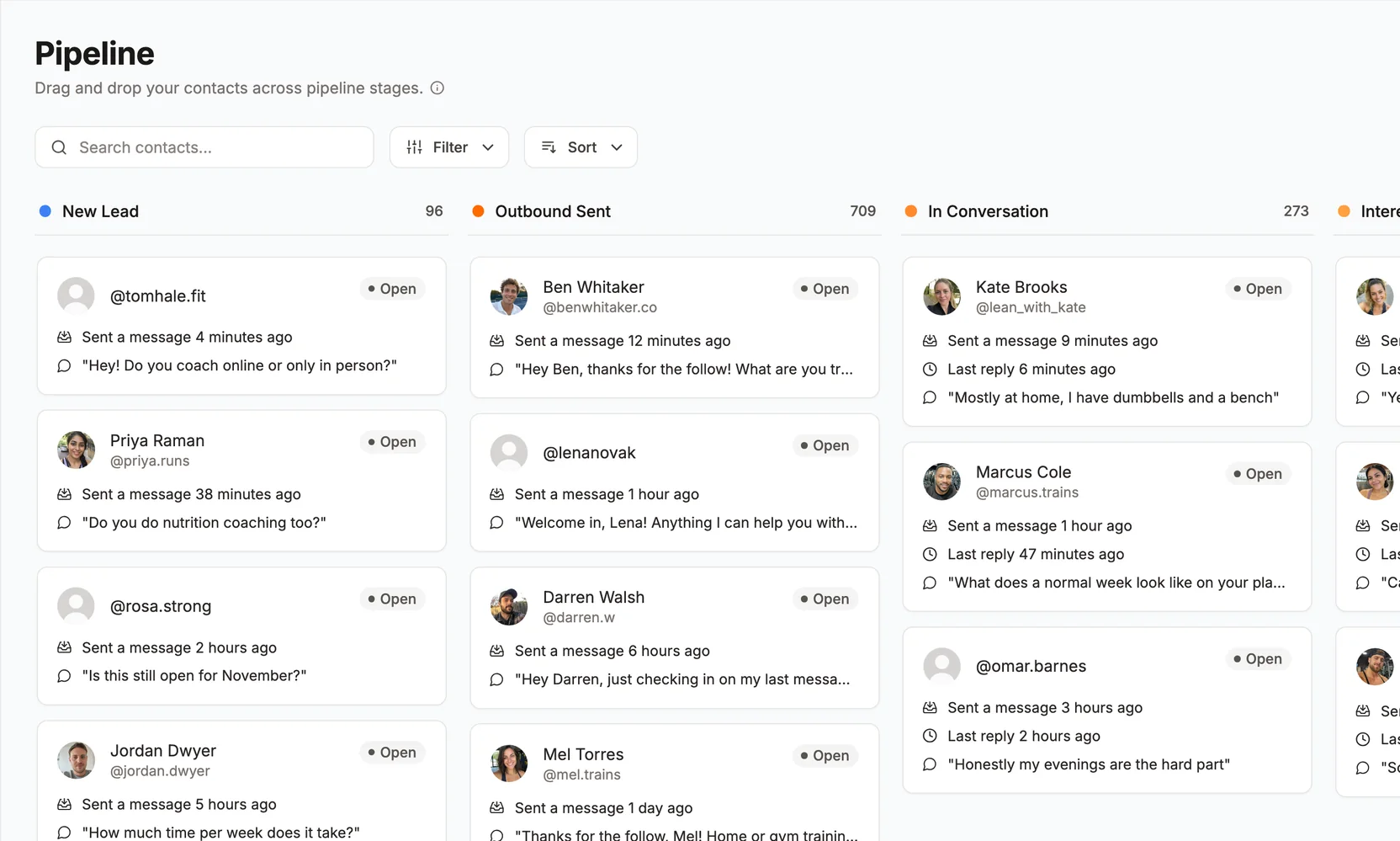
Contacts move across seven default stages. New Lead, Outbound Sent, In Conversation, Interested, Meeting Booked, Closed, Lost. You drag a card when the conversation moves, and the shape of the board tells you the truth about your week. A wall of cards in In Conversation with almost nothing in Interested or Meeting Booked means you are chatting rather than asking, which is the most common leak in any Instagram DM sales funnel. Closed means closed. There is no separate column to argue about.
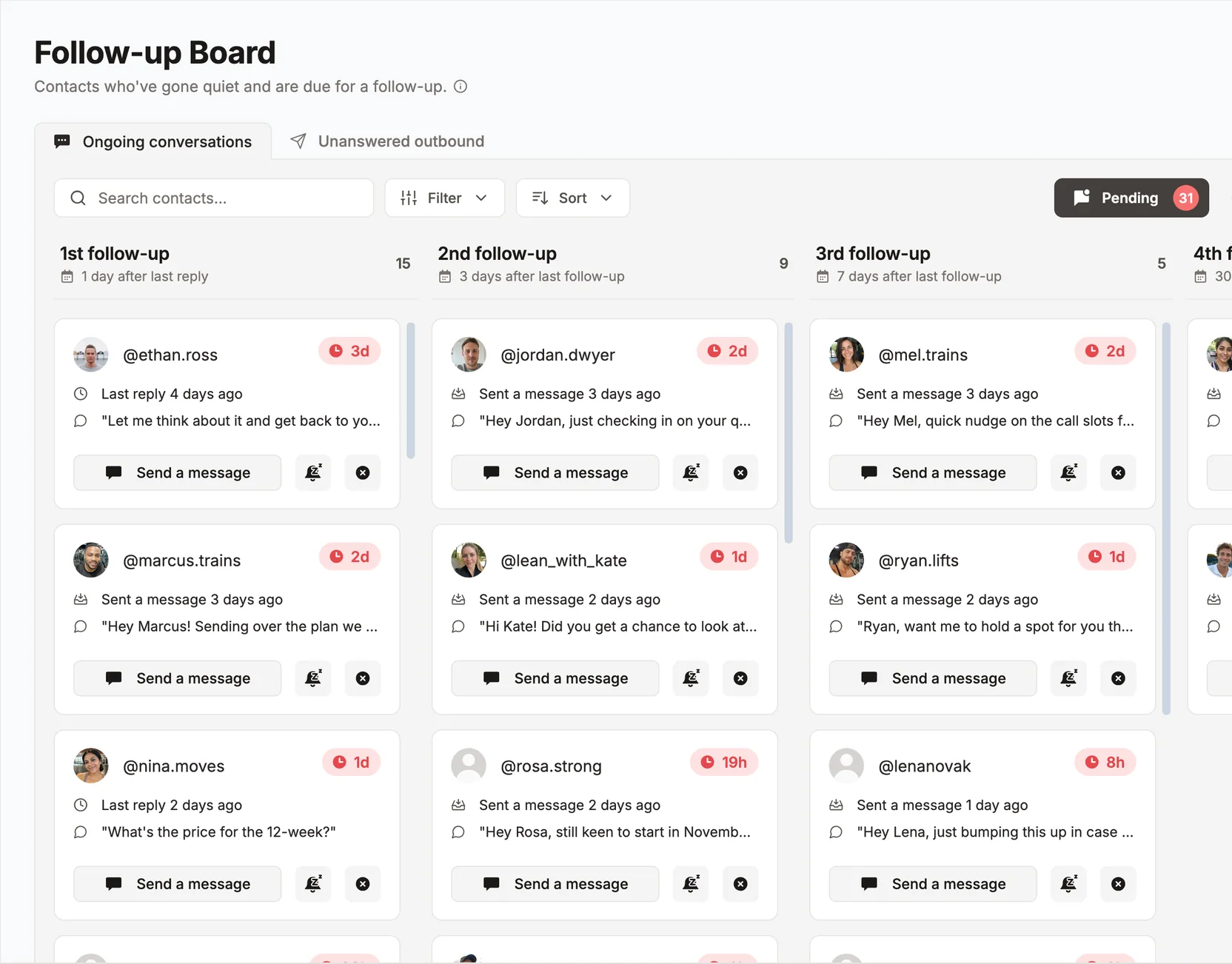
A separate follow-up board catches the people who went quiet. Your follow-up stages sit on their own board with timing you set, and it surfaces everyone who is overdue instead of leaving that count in your head. The timer runs off your last sent message, so replying from the Instagram app on your phone resets it without you ticking anything off. That is the difference between remembering four people and remembering four hundred, and it is why a dedicated follow-up tool for Instagram DMs outperforms any reminder app.
Tags and the contact table do the sorting Instagram will not. Label by source, offer, or how warm someone is, then filter the table down to exactly that group. Tags feed the stats, so you can see which source turns into booked calls instead of guessing.
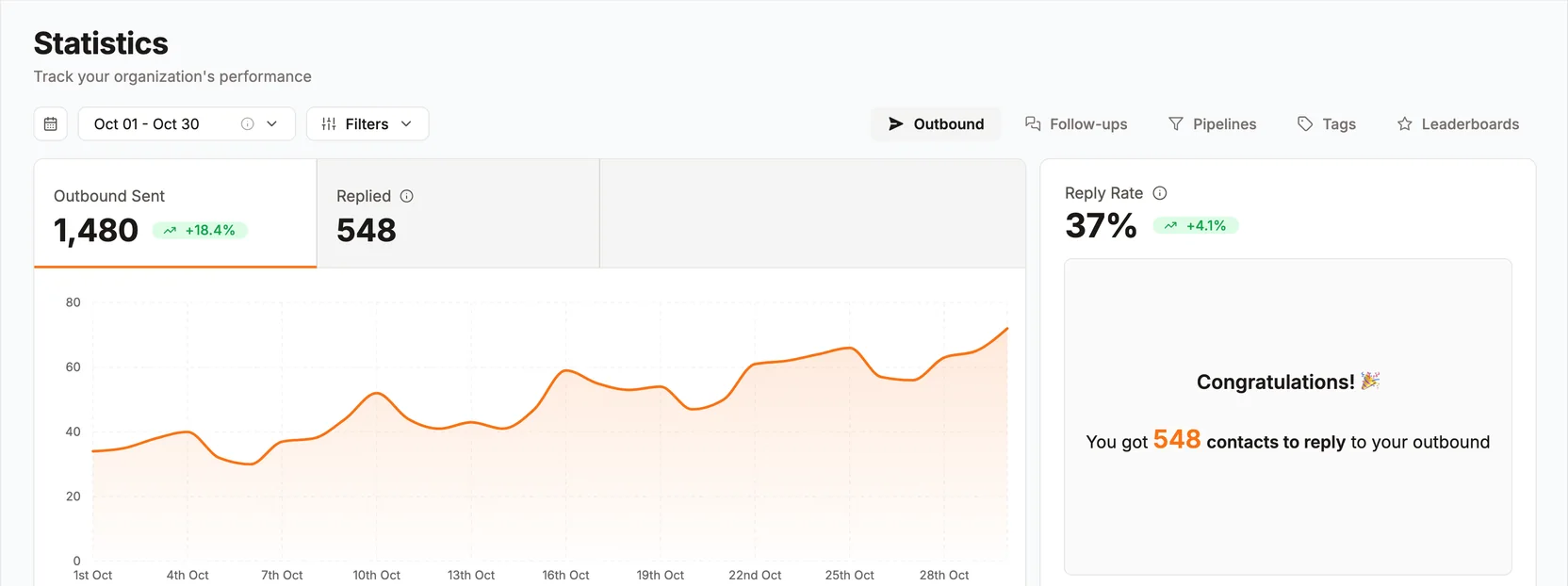
The numbers show up by themselves. Messages sent, reply rate, follow-up success, on-time versus late follow-ups, plus a leaderboard if you have setters. Run two opening messages side by side and the reply rate tells you which one to keep, which beats arguing about it.
Replies stay inside Meta’s rules. Meta’s Messenger Platform and IG Messaging API policy gives you a 24-hour standard messaging window that resets each time the person writes back. Inside it you can reply from DM Tracker. Outside it, Instagram rejects anything an outside tool tries to send, so you get a one-click jump into the chat in Instagram. That same window governs anything a tool sends on your behalf. ManyChat can fire an automated reply inside those 24 hours, and that is where it stops: a multi-day drip pushed out by any tool is not something you should build, no matter who sells it to you.
It runs $39 per user per month with a 14-day free trial, and the trial answers the real question fast. Within days the follow-up board shows you how many conversations you had been letting go quiet without noticing.
Can You Track Instagram DMs Without Them Knowing?
Two very different questions hide behind that search, so let us separate them.
The first is whether you can read somebody else’s DMs. You cannot, and DM Tracker will never be the tool for it. Meta’s API returns conversations only for the account that granted permission, and there is no permission that hands over a stranger’s inbox. DM Tracker is not a spy tool and it is not built to watch anyone. It tracks your own business conversations on an account you own and connected yourself. Sites promising a view into someone else’s messages are collecting logins, and the only account at risk in that transaction is yours.
The second question is what the person you are talking to sees. They see a normal Instagram conversation, because that is all it is. Stages, tags, notes and owners live on your side of the desk, and nobody gets a notification because you tagged them warm. Read receipts are an Instagram setting and you manage them in Instagram, exactly as you did before.
There is one thing worth being clear about. Tracking is not a way to answer fewer people. It is a way to stop answering whoever shouted most recently and start answering whoever has been waiting longest.
Which Version of DM Tracking You Actually Need
Pick by where you are, not by what looks impressive:
- A handful of live conversations, one person answering. Use Instagram’s flags and filters, check Requests daily, and skip the software. Software will not fix a problem memory is still handling.
- Selling seriously, still solo. You need stages and a follow-up board. The tell is simple: you can no longer say how many people are waiting on you.
- Two or more people on one account. You need owners, an activity log and a shared board, or you will keep double-answering some buyers and ignoring others.
If you are between options and want the field laid out side by side, the Instagram DM tools comparison covers what each type of tool does and does not do.
One timing point applies whichever version you pick. The manual methods only track from the day you start, and a connected tool reaches back 90 days at most. Anything older stays buried in the inbox. That is the whole case for setting this up before the next busy stretch instead of during it.
Related: Organizing Instagram DMs for business, DM Tracker vs spreadsheets, the best Instagram DM CRM, follow-up tool for Instagram DMs.
Frequently Asked Questions
No. DM Tracker only sees conversations on an account that was connected to it by the person who controls that account, through Instagram's own permission screen. Meta's API returns messages for the granting account and nothing else, so there is no plan, setting or workaround that opens a stranger's inbox. On a team, every account gets connected on purpose by its owner. Any website promising to show you someone else's DMs is after your login, not their messages.
Yes, the recent ones. When you connect, DM Tracker offers to sync your conversations from up to the last 90 days, and an account that is already connected can run it any time with the Sync Conversations button in the Connections tab. For long threads, Instagram's API returns the most recent messages rather than every message ever sent. From then on, new messages arrive through Meta's webhooks as they happen. Anything older than 90 days stays in the Instagram app, and if you want it for your records, Instagram gives it to you directly through the data export in Accounts Center.
You assign conversations. In the Instagram app, two people signed into one account are invisible to each other, so the same buyer gets answered twice while somebody else gets nothing. DM Tracker gives each teammate a login into a shared workspace, puts an owner on every contact, and keeps an activity log of who replied and when. One view shows every conversation and who has it, which ends the 'I thought you were handling that one' problem.
No, as long as the connection runs through Meta's official Instagram API and the account owner approves it on Instagram's own screen, which is how DM Tracker connects. Nothing is scraped, no password changes hands, and DM Tracker never messages anyone by itself. Replies you send go out inside Meta's 24-hour standard messaging window, the same rule Instagram applies to every tool on its platform. The tools worth worrying about are the ones asking for your Instagram password.
Start with five numbers: first messages sent, replies received, meetings offered, meetings booked, and conversations closed. Put your follow-up numbers next to them, meaning who is overdue and how often follow-ups go out on time. Those tell you where the leak is. A weak reply rate points at your opening message. A pile of contacts stuck in the middle with almost nothing in Interested or Meeting Booked means you are talking, not asking.
A few minutes. You need a Business or Creator account, which is a free switch inside the Instagram app, then you approve the connection on Instagram's permission screen, choose whether to sync up to 90 days of recent conversations, and new messages start arriving. The part worth slowing down for is your tag list, because tags decide what your numbers can tell you three months from now. You can have the board running today and spend the first week tightening the tags.